What Is a VTT File? WebVTT Explained, and How to Convert SRT to VTT
A VTT file holds WebVTT subtitles, the caption format built for the web. Learn how it differs from SRT, how to open one, and how to convert SRT to VTT in a minute.

Зміст
01What a VTT file looks like02VTT vs SRT: the differences03How to open a VTT file04How to convert SRT to VTT05Styling and positioning in WebVTT06Common VTT problemsA VTT file is a subtitle file in the WebVTT format (Web Video Text Tracks). It was designed for video on web pages, which is why browsers support it natively and why you often find .vtt files next to online video. If you have used SRT files before, VTT will look very familiar, with a few useful extras.
This guide shows what a VTT file contains, how it differs from SRT, how to open it, and how to convert SRT to VTT.
What a VTT file looks like
WEBVTT

00:00:12.400 --> 00:00:15.100
We leave at first light.

00:00:15.600 --> 00:00:18.250 line:85% align:center
Then we had better get some sleep.
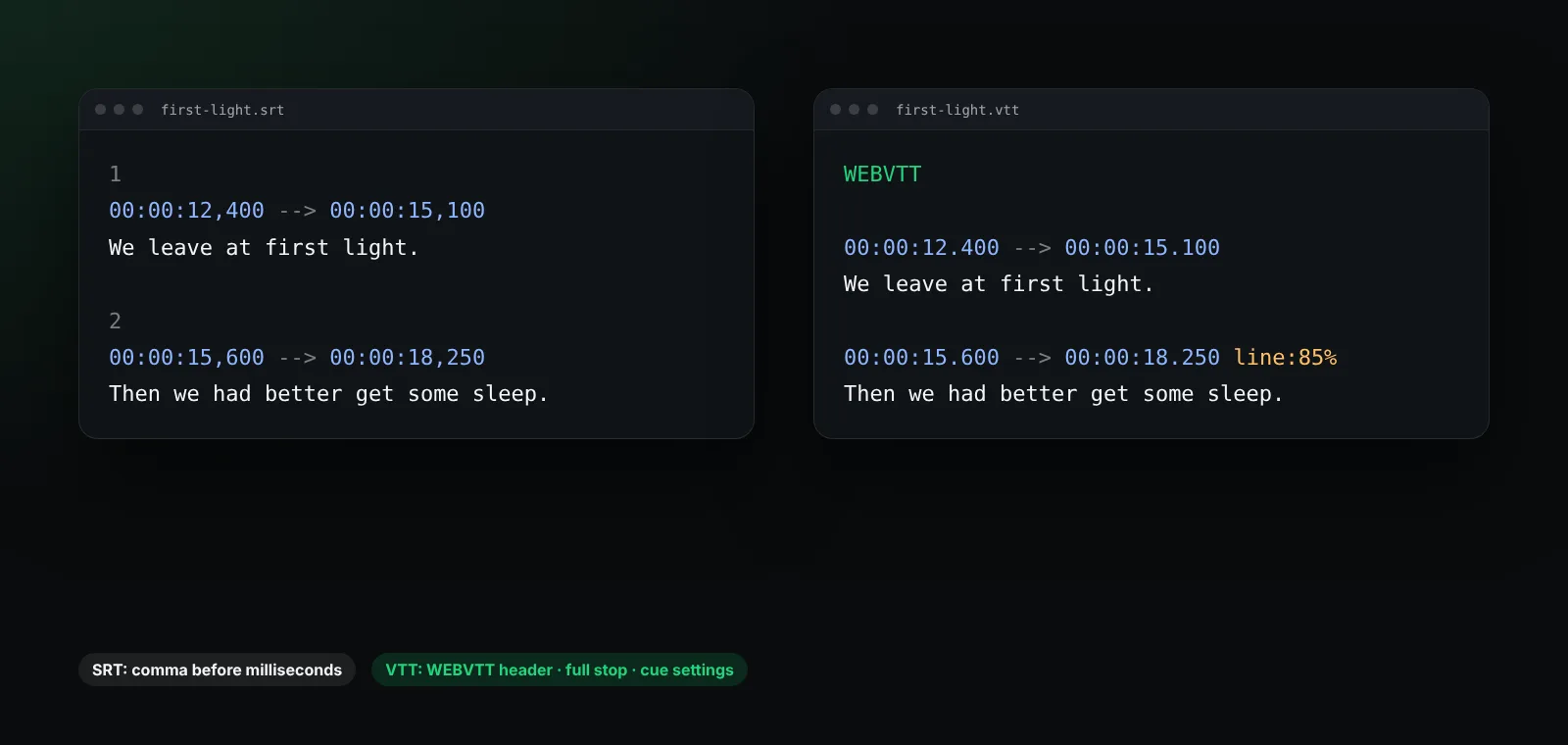
The important parts:
- The header. Every VTT file starts with the word
WEBVTTon the first line. Without it, players reject the file. - Timestamps with a full stop before the milliseconds:
00:00:12.400. Hours are optional, so00:12.400is valid too. - Cue numbers are optional. You can label a cue with a number or a name, or leave it out.
- Cue settings after the time, such as
line,position,alignandsize, control where the text appears.
VTT vs SRT: the differences
| SRT | VTT (WebVTT) | |
|---|---|---|
| First line | Cue number | WEBVTT header |
| Millisecond separator | Comma , |
Full stop . |
| Cue numbers | Required | Optional |
| Position and alignment | Not supported | Supported with cue settings |
| Styling | A few tags | Tags, classes and CSS |
| Comments and metadata | No | NOTE blocks and metadata cues |
| Native in web browsers | No | Yes |
In short: SRT is the simplest and most widely supported file; VTT is the web standard and adds positioning and styling. For everyday viewing both work equally well in BetterStream. If you want the background on SRT, read what is an SRT file.
How to open a VTT file
A VTT file is plain text. Open it with Notepad on Windows, TextEdit on a Mac (in plain text mode) or any code editor to read or fix it.
To watch with it, load it into your player. In BetterStream, open the subtitles menu during playback and load the .vtt file. You can then change the size, colour and background, and shift the timing if needed.
How to convert SRT to VTT
Converting SRT to VTT by hand takes three changes:
- Add a first line that says
WEBVTT, followed by an empty line. - Replace the comma in every timestamp with a full stop:
00:01:02,500becomes00:01:02.500. - Optionally remove the cue numbers.
Save the result as UTF-8 with the .vtt extension. Most text editors can do step 2 with find and replace if you search for , only inside timestamps. Subtitle editors and many online tools can also export to VTT in one click.
Going the other way, VTT to SRT, means removing the header, turning full stops back into commas, adding cue numbers and dropping any cue settings, since SRT cannot use them.
Styling and positioning in WebVTT
WebVTT can place a line at the top of the screen, for example when the bottom shows important on-screen text:
00:02:10.000 --> 00:02:12.000 line:10%
(Radio crackles)
Web pages can also style cues with CSS using the ::cue selector. A player may choose to keep its own settings, so a viewer who needs larger text still gets it. In BetterStream your size, colour and background choices apply to every format, so subtitles stay readable whatever the file says.
Common VTT problems
- The file will not load: check that the very first line is exactly
WEBVTT. - Times look right but nothing shows: a timestamp with a comma instead of a full stop will break the cue.
- Odd characters: save the file as UTF-8.
- Everything is early or late: use the timing controls, as described in how to sync subtitles.
Frequently asked questions
Is VTT better than SRT?
Neither is better for plain dialogue. VTT adds positioning and styling and is native to browsers; SRT is simpler and works almost everywhere.
Can I rename an SRT file to VTT?
Not quite. You also need the WEBVTT header and full stops in the timestamps. Without those changes most players will reject it.
Does BetterStream support VTT subtitles?
Yes. BetterStream loads VTT, SRT and ASS files, and uses subtitle tracks that come with the stream.
What does WebVTT stand for?
Web Video Text Tracks. It is a W3C format for captions, subtitles, chapters and other timed text on the web.
More questions? See the help center.